How to see ChatGPT visitors in Google Analytics
Google Analytics now has a row just for visits from ChatGPT and other AI assistants. Here's where to find it, and what the number does and doesn't tell you.
Maybe a customer has told you they found you through ChatGPT. Maybe you've just wondered whether it happens. Either way, you can now check, and it takes about five minutes.
The place to look is Google Analytics, the free tool most websites use to count their visitors. In May 2026 Google added a row to one of its reports that counts visits from AI assistants such as ChatGPT. This guide shows you where to find that row and how to read the number in it.
Before you start
You'll need to log in to your company's Google Analytics. The current version is called GA4, and if your website uses Google Analytics at all, it's almost certainly this one.
If you don't have a login, ask whoever looks after your website to add you. Viewer access is enough, and it means you can't change anything by accident.
Find the AI Assistant row
Go to analytics.google.com and open your website's account.
In the menu on the left, click Reports.
Click Acquisition, then Traffic acquisition.
Set the date range in the top right to the last 90 days.
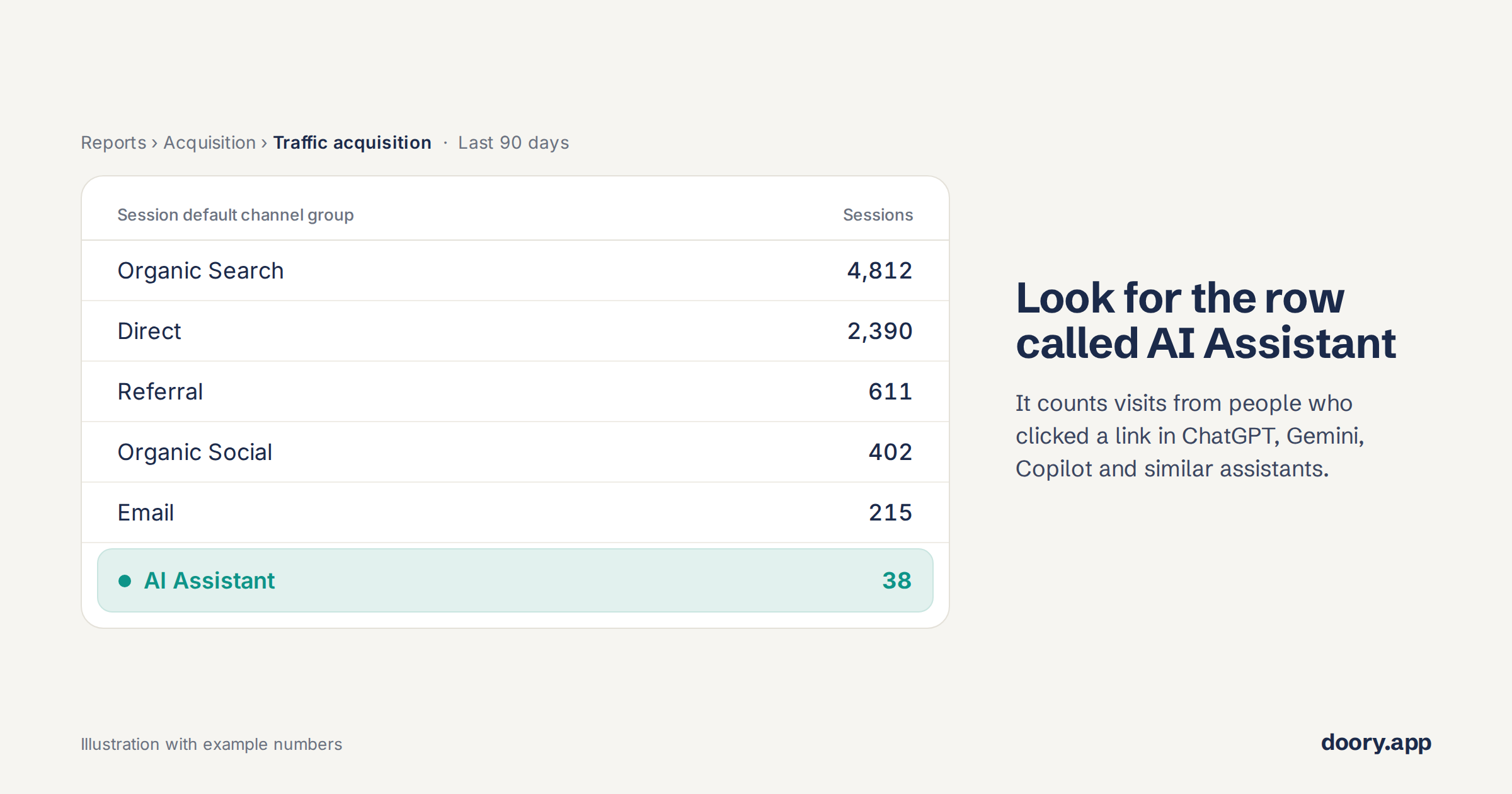
In the table, find the row called AI Assistant.
The number in the Sessions column next to it is the one you're after. In the example below, it's 38.
What the number tells you
Each session is one visit. So 38 sessions over the last 90 days means that 38 times, someone clicked a link to your website inside an answer from ChatGPT, Gemini, Copilot or a similar assistant.
That is worth knowing. It means that when people ask AI about the kind of problem you solve, it sometimes mentions you, and some of those people are curious enough to come and look.
Don't worry if the number is small. For most websites, AI assistants still send well under one visit in a hundred. It is growing quickly, though. According to SE Ranking, which tracks traffic across more than 100,000 websites, ChatGPT's share of visits to UK websites rose by almost two fifths in May 2026 alone.
These visitors can also be worth more than their numbers suggest. When Ahrefs looked at its own website, AI assistants brought about one visit in 200 but about one signup in eight. That's a single company, but it shows why a small row can still matter.
The most useful thing to do with the number is check it again in a month or two and see which way it's moving.
Why the real number is higher
The AI Assistant row only counts people who clicked. Plenty of people don't click.
Imagine someone asking ChatGPT for a good payroll tool for a small business. They read the shortlist, notice your name and close the chat. The next morning they search for you on Google and visit your site. Google Analytics counts that visit as Organic Search, and nothing connects it back to ChatGPT.
A few other visits slip past the row too, such as clicks from Google's own AI answers are counted as ordinary Google search, and any AI visits from before May 2026 sit in the Referral row.
For software companies, this hidden part is probably large. In G2's survey of over 1,000 software buyers this spring, about half said they now start their research with an AI chatbot more often than with Google.
Ask the people Google Analytics can't see
Since those visitors don't show up as AI traffic, the only reliable way to find them is to ask them.
You could do this through a question to your contact or demo form: "How did you hear about us?" Make it a free-text box rather than a dropdown. A dropdown only offers the channels you already expected, while a text box lets people write "ChatGPT recommended you" in their own words.
After a few weeks, read through the answers, give them to an AI to sort through if you have a lot of results. Put them next to the AI Assistant row and you'll have a much fuller picture than either gives you on its own.
What to do with what you find
If the row or the form shows AI sending people your way, talk to a few of them. On a first call, ask what they typed and what the answer said about you. It's often the most useful thing you'll hear all week.
Then ask ChatGPT the same question yourself. Try it a few times on different days, because the answer keeps changing. SparkToro found that AI tools gave the same list of brands less than once in 100 tries.
Where Doory fits
Google Analytics shows you the visits, but not the answers that sent them. Doory asks ChatGPT, Gemini and Claude the questions your customers ask, every week. It shows whether you're named and who is named instead, along with what to fix first. You can also start to monitor progress over time, spot trends, and make steps to improve the chances of being mentioned in AI answers. You can try it free at doory.app.